With Quickture 1.4.1, you can finally edit like an editor!
This release introduces two workflow upgrades designed to remove everyday friction from your edit. You can now pin a sequence to the Quickture panel so it stays there even when you open another sequence in your timeline. And, you can now send your Quickture sequence to the Source or Program Monitor! Click on the transcript to move the playhead in Source or Program, so it fits naturally into the way you already work.
Less UI wrangling. Fewer interruptions. Your flow state says thanks.
We’ve also added new language support and tightened things up behind the scenes with stability improvements and a fix for Quick Export in Avid.
You can now pin the Quickture panel, so it doesn’t change when you select other sequences in your bins.
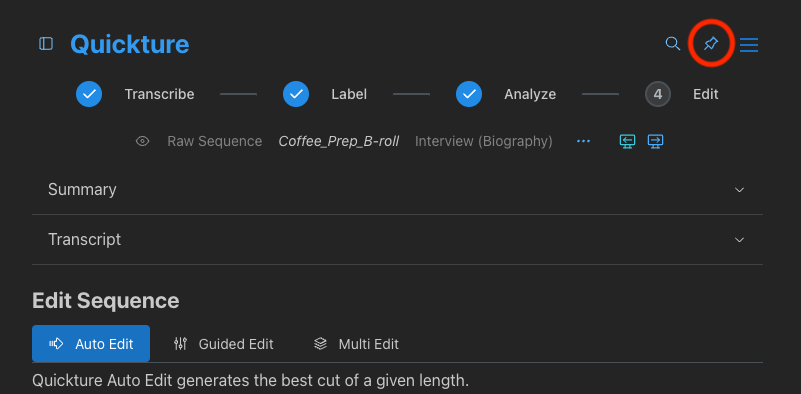
When a sequence is pinned, it stays active in the Quickture panel — even if you click on another sequence. Browse, reference, compare… Quickture doesn’t flinch.
Perfect for:
Working on one sequence while exploring others
Referencing dialogue or visuals without constantly reselecting your target
Staying in your editing groove instead of fighting the UI
Quickture’s sequence can now be sent directly to either the Source monitor or the Program monitor, so you can edit your way.
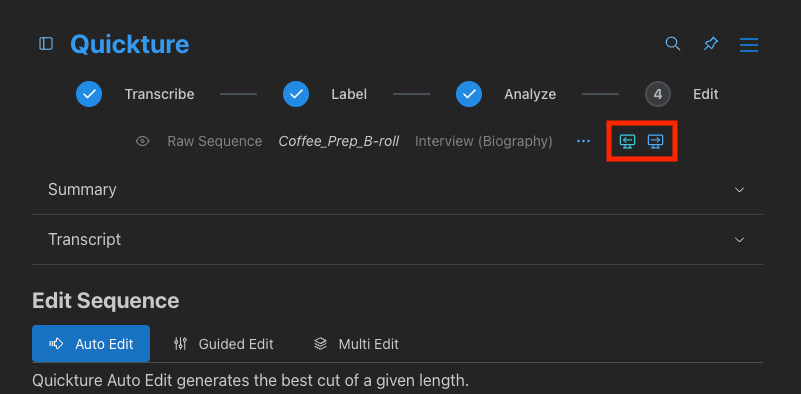
This makes it easier to:
Edit material from a Quickture sequence into other sequences
Keep an eye on Quickture’s transcripts while you’re cutting
Integrate Quickture into your Source/Record workflow
Less panel shuffling. Fewer distractions. Editing, uninterupted.
Quickture now supports Canadian French and Hebrew, expanding our growing list of supported languages for transcription and editing.
Fixed an issue where Quick Export (Avid-only) could fail on sequences with many clips and/or long filenames
Fixed an issue with Merge Speakers that led to buggy transcripts. Now you can merge speakers without fear.
We’ve renamed the Quickture Data folder to Quickture Exports to better reflect what actually lives there.
The Quickture Exports folder is used for:
Temporary exports like AAF files and MP3 files generated during transcription and analysis
Saved transcripts in the formats you choose (Word, Excel, Text, SRT, and way more)
By default, temporary exports are automatically removed after upload, so they don’t pile up on your system. Transcript exports, on the other hand, are kept right where you expect them.
Clearer name. Same Stuff.
